 SWRainAlert
The 24-hour advisory
When the forecast total for a site reaches that site’s own permit trigger inside 24 hours, the people who cover it get one email. One per episode — not a fresh warning every hour the forecast still says so.
Everything in the app, not just the alert
SWRainAlert didn't stop at "tell me when it rains." Below is the forecast warning that reaches you while there is still time to act, the dashboard your compliance manager opens on Monday, the year of rainfall history behind every threshold, the archive an auditor gets pointed at, and the API that puts all of it where your other project data lives.
Told before the storm, not only after it.
Ranked exposure, open-item ageing, weekly trend.
A year of both sources, with gaps drawn as gaps.
Search every filed record, export a range as one PDF.
Invitations, admins, sites assigned by name.
The filed PDF reaches the owner and the county by itself.
Read-only keys, signed webhooks, a public sandbox.
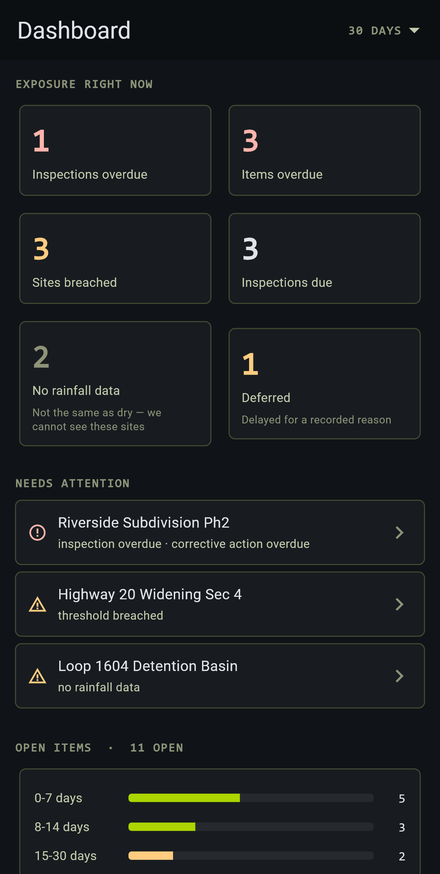
The compliance manager's screen
The dashboard opens on exposure: how many inspections are overdue, how many corrective actions are overdue, how many sites are breached right now, and how many sites have gone dark — no reading from either NOAA source, which is a gap the dashboard names, not a silent zero.
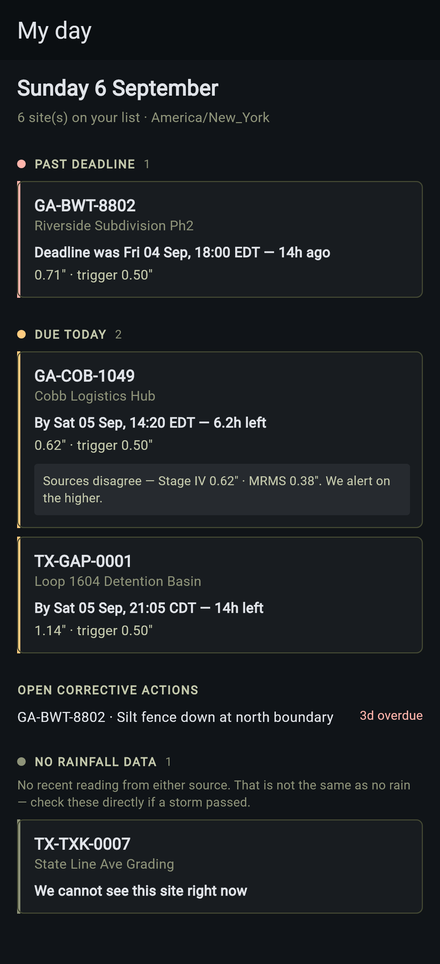
The inspector's screen — and their inbox
My Day is one inspector's own list: what's past deadline, what's due today, which open corrective actions are theirs, and which of their assigned sites the radar can't currently see. Nothing from another inspector's list, and nothing missing because it's a "quiet day" — a quiet day says so.
The morning digest is the same view, emailed at 6am in the timezone of the sites that inspector covers — not a shared org-wide time that puts a Georgia inspector's day on the wrong clock. It's sent even when nothing is due, because an inspector who gets nothing can't tell "quiet day" from "the job silently died overnight."
Never doubled, never dropped. You get exactly one digest per inspector per day — never two for the same morning because a server restarted, and never a silent gap because a send was missed.
Before the storm, not only after it
Observed rainfall tells you an inspection is now due. A forecast tells you to move a crew, stabilise a slope or empty a basin while there is still time to do it. SWRainAlert reads the National Weather Service alongside the two NOAA observation products.
When the forecast total for a site reaches that site’s own permit trigger inside 24 hours, the people who cover it get one email. One per episode — not a fresh warning every hour the forecast still says so.
Active National Weather Service products for each site’s own grid cell, filtered to the rain-relevant ones. A flash flood warning over a site you are responsible for is not something to find out about from the radio.
Every hourly forecast is kept and later scored against what actually fell — hits, misses, false alarms, and the average error. You can see how much to trust the warning before you act on it, per site and across the fleet.
A forecast creates no obligation. Your permit triggers on rain that fell, and nothing here changes that. An advisory is a heads-up so the work can be planned; the inspection clock starts only when an observed reading crosses the threshold. We keep the two in separate records for the same reason — a forecast that did not materialise is not a rain event, and must never look like one.
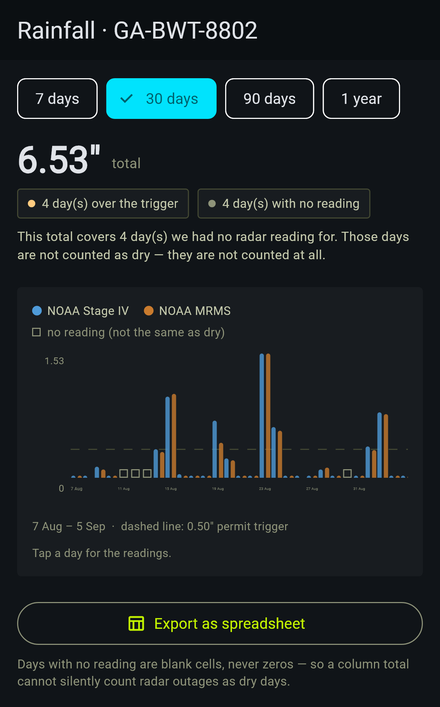
Not just the current storm
Every site carries 7/30/90/365-day views of its own accumulation history — both NOAA products, side by side, exactly as recorded when the evaluator ran. Nothing is recomputed after the fact to make a chart look tidier than the record.
The open items nobody was tracking before
"Fix the silt fence" written on a clipboard has no memory. Raised in SWRainAlert it has an open timestamp, a site, an age, and — when it's done — who closed it and when.
Not only during a formal inspection — an item can be opened the moment someone notices it, which is most of the time how it actually happens on site.
Closing an item stores who closed it and when — it's a record appended to, never a row deleted, so the history of what happened stays intact.
The dashboard's weekly chart plots items opened against items closed, with the net change — so a backlog that's quietly growing shows up before it's ninety days old.
When a records request lands on your desk
The archive searches filed inspections across every site an account can see — by date range, by site, or across the whole portfolio — and exports the result as a single PDF, because a records request rarely wants one report at a time.
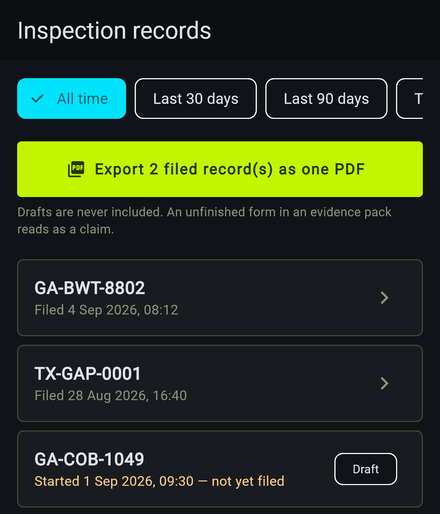
The people who never sign in
Most of the people who need a stormwater record will never open your software. The owner, the engineer of record, the county reviewer — they need the PDF in their inbox. Doing that by hand is how it stops happening in week three.
And the ones who want less mail
Everyone controls their own daily summary: on or off, which hour in their own local time, every day or weekdays only, or only on days something is actually owed. A pause for a holiday expires by itself rather than being forgotten.
One thing is deliberately not adjustable. Storm alerts go to the site’s own alert address, and nothing a person does to their own inbox can turn them off. Unsubscribing from a digest, or from the reports you receive as an external contact, never silences a regulatory deadline — and the unsubscribe page says so in as many words.
Built for a crew, not one phone
Every site can be assigned to a named inspector, every organization can hold more than one user, and an admin can see what an individual inspector can't — the unassigned sites nobody has claimed yet.
More than one user per organization, with an admin role that can invite, promote, or deactivate — but never remove the last admin standing.
An admin invites a colleague by email; they accept and set their own password. No shared logins, no handing a phone around the site trailer.
Every site has an assigned inspector. Their My Day and their digest show exactly their sites — an admin's view additionally surfaces the ones nobody owns yet.
Eighty sites in one upload. Every row is reviewed before anything is created, showing the state, timezone and trigger each coordinate derives — and a row near a state line is flagged, because half a mile is a different permit. One bad row costs that row, and downloads back as a fixable file.
An admin can add an organization's own questions onto a state's permit form. Change the questions later, and inspections already filed keep the ones they were filed with.
A construction site rarely has good signal
Cached fleet data paints before the network is even tried. A write outbox holds inspections and photos until a signal comes back, and a banner always says how old the cached data is — never pretending it's live when it isn't.
Search an address or drop a pin on the map. State, timezone and the applicable threshold are derived from the coordinates — nobody has to look up a permit to register a site.
Captured on the phone, downscaled on-device before upload, and attached to the inspection it belongs to — including while offline, via the write outbox.
A push notification with alarm sound and vibration fires the moment a site you're assigned to breaches — not just an email you might not see until you're back at a desk.
For the systems that already run your projects
Compliance data is worth more where your other project data already lives. Both routes out are built, documented, and testable before you have an account.
Read-only or read-write, hashed at rest, with an expiry, a revocation switch and a last-used timestamp. Only an admin signed in with a password can mint one — a key that could mint keys would make the scope decoration.
Breaches, overdue and filed inspections, corrective actions opened and closed, forecast advisories and NWS alerts pushed to your endpoint, HMAC-signed with the timestamp inside the signed material. Retried with backoff, with a delivery log showing your own server’s response.
Paste real coordinates and get the actual permit reasoning and the real dual-source rainfall for that point — the same grid cell a paying site would read. No account, no card, nothing created.
Reasoning over your own records
The useful application of a model here is not identifying a silt fence in a photograph. It is reasoning about permits, deadlines and the records you already filed.
“Which sites are overdue?” “What does Georgia require after half an inch?” It reads your sites, open items, inspections and the permit rules — read-only, never across organisations — and shows you which of those it checked.
A plain-language summary of what a visit found, the items opened and closed, and what follows — generated after filing, never during it, and labelled on the report as AI-assisted. The answers you signed remain the record.
Point it at an evidence photo and it drafts a finding. The draft is never filed by itself — a person edits it and accepts it as a corrective action, or discards it. It is a first sentence, not a verdict.
What we will not claim. This does not decide whether your site is compliant, and a model’s reading of a photograph is not an inspection. Every AI-assisted output is labelled as one, the inspector’s own answers remain the record, and nothing generated is filed without a person accepting it.
Looking for the alerting engine itself? The dual-source rainfall monitoring, the five-minute evaluator, the dry-gap reset and the state permit thresholds that everything on this page sits on top of are covered in full on how it works. This page is what happens once that alert lands — the dashboard, the history, the records and the team around it.
Thirty days of the Complete plan, every feature on this page included, no card. Add your sites and the dashboard, the history and the archive start filling in from the next storm.